
NPS Calculator
Results
| Retirement Corpus (₹) | Annuity Invested (₹) | Monthly Annuity Income (₹) | Lump Sum Withdrawable (₹) |
|---|
What Is an NPS Calculator?
An NPS Calculator is a digital utility tool designed to help investors estimate the size of their retirement corpus and the monthly pension they can expect to receive. It takes the guesswork out of financial planning.
Instead of manually crunching complex compound interest numbers, you simply input your details—such as your age, monthly contribution amount, and expected return—and the calculator projects your financial future. It essentially bridges the gap between your current savings and your retirement goals.
How can an NPS calculator help you?
Using an NPS Calculator is the first step toward a stress-free retirement. Here is how it assists you:
- Financial Clarity: It gives you a clear picture of how much money you will accumulate by the time you turn 60.
- Goal Setting: If the projected corpus looks insufficient, the calculator helps you adjust your current monthly contributions to meet your desired target.
- Asset Allocation: It helps you decide how much risk to take (equity vs. debt) by showing how different rates of return affect your final outcome.
- Discipline: Seeing the potential "magic of compounding" encourages you to start investing early and stick to your plan.
How does the NPS Calculator Work?
The NPS Calculator functions on the principle of compound interest applied to monthly contributions. To give you accurate results, it requires specific data points:
- Current Age: The younger you are, the longer your money has to grow.
- Contribution Amount: The sum you plan to invest every month.
- Expected Rate of Return: Since NPS is market-linked, you must estimate a return percentage (typically between 8% to 12% depending on equity exposure).
- Annuity Purchase %: The percentage of your total corpus you intend to use to buy a monthly pension (minimum 40%).
Based on these inputs, the calculator computes the total interest earned and the final maturity amount.
Formula for calculating Pension amounts
While online tools are convenient, understanding the math behind them is empowering. The NPS Calculator uses the formula for the Future Value of an Ordinary Annuity.
The formula to calculate the total corpus is:
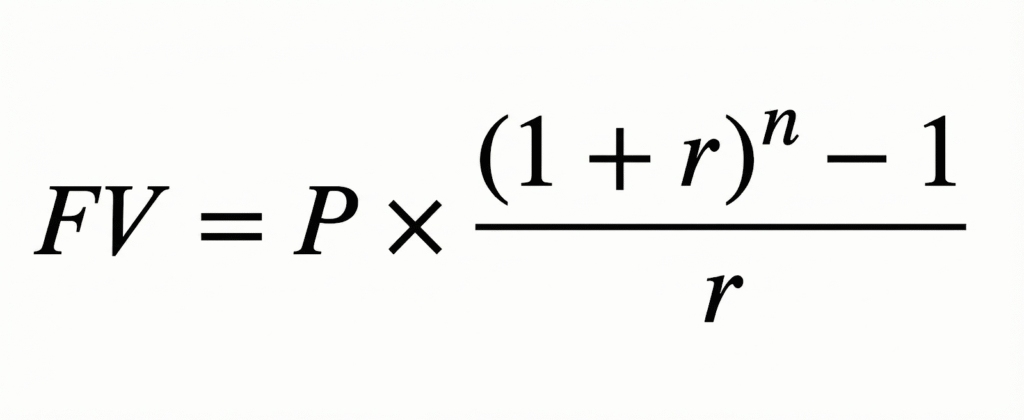
Where:
- FV = Future Value (Total Corpus)
- P = Monthly Contribution Amount
- r = Monthly Interest Rate (Annual Rate / 12 / 100)
- n = Total Number of Contributions (Years to maturity x 12)
Once the total corpus is determined, the monthly pension is calculated based on the annuity rate provided by the insurance service provider.
Example of NPS Calculation
Let’s look at a practical scenario to see the NPS Calculator in action.
Scenario:
- Investor Age: 30 years
- Retirement Age: 60 years (Investment duration: 30 years)
- Monthly Contribution: ₹5,000
- Expected Return (ROI): 10% p.a.
The Results:
- Total Amount Invested: ₹18,00,000 (18 Lakhs)
- Total Interest Earned: ₹95,96,627 (approx. 96 Lakhs)
- Total Maturity Corpus: ₹1,13,96,627 (approx. 1.14 Crores)
If the investor uses 40% of this corpus for an annuity (pension) and withdraws 60%:
- Lump Sum Withdrawal: ₹68,37,976
- Annuity Value: ₹45,58,651
- Estimated Monthly Pension (at 6% annuity rate): ~₹22,793 per month.
How to use AK Shah Finance online NPS calculator
Using the AK Shah Finance NPS Calculator is straightforward and designed to give you a quick snapshot of your retirement finances. Just follow these simple steps:
- Enter Your Contribution:
- Locate the field labeled "Monthly Contribution (₹)".
- Enter the amount you plan to invest in NPS every month.
- Set Your Return Expectations:
- In the "Expected Return Before Retirement (% per year)" field, input the annual interest rate you expect your investment to earn (typically between 8%–12%).
- In the "Expected Annuity Return (% per year)" field, enter the interest rate you expect to earn on your pension fund after retirement (e.g., 6%).
- Decide Your Pension Portion:
- Find the "% of Corpus for Annuity" field.
- Enter the percentage of your total savings you want to use for purchasing a monthly pension. Note: The minimum mandatory requirement is 40%.
- Input Your Age Details:
- Enter your "Current Age" (e.g., 30) to establish when you are starting.
- Enter your "Retirement Age" (e.g., 60) to determine how long you will be investing.
- Click Calculate:
- Once all fields are filled, click the green "Calculate" button.
Understanding Your Results
Immediately after clicking, the calculator provides a clear summary in four boxes:
- Retirement Corpus: The total wealth you will have accumulated by the time you retire.
- Annuity Invested: The portion of your money that is locked to generate your monthly pension.
- Monthly Annuity Income: The estimated monthly pension you will receive.
- Lump Sum Withdrawable: The cash amount you can take home tax-free immediately upon retirement.
Advantages of using the National Pension Scheme calculator
Why should you rely on a digital tool rather than manual calculation?
- Accuracy: It eliminates human error in complex compounding calculations.
- Speed: You get instant results, allowing you to run multiple scenarios in minutes.
- Comparison: You can quickly see the difference between investing ₹5,000 vs ₹10,000.
- Future Planning: It assists in calculating the exact annuity portion required to maintain your lifestyle post-retirement.
What Happens at Maturity? Lump Sum + Pension Calculation
At the age of 60, the NPS matures. The NPS Calculator usually displays the output in two distinct parts because you cannot withdraw the entire amount as cash.
- Lump Sum Component (Max 60%): You can withdraw up to 60% of your total accumulated corpus completely tax-free. This is your "cash in hand" for immediate post-retirement goals.
- Annuity Component (Min 40%): The remaining 40% (or more, if you choose) must be used to purchase an annuity from a PFRDA-registered insurance firm. This amount generates your monthly pension for the rest of your life.
Who can use the NPS Calculator?
The beauty of the NPS Calculator is that it is universal. It is useful for:
- Salaried Employees: Both private and government sector employees planning for life after the paycheck stops.
- Self-Employed Individuals: Freelancers, business owners, and consultants who do not have a statutory provident fund.
- NRIs: Non-Resident Indians aged between 18 and 60 generally can also invest in NPS and use the calculator to plan Indian retirement.
- Young Professionals: Anyone between the ages of 18 and 70 who wants to leverage the power of compounding.
NPS Tax Benefits Overview
While the primary goal is retirement, many users flock to the NPS Calculator to see tax savings. NPS is one of the most tax-efficient instruments in India.
| Section | Deduction Limit | Details |
|---|---|---|
| 80C | Up to ₹1.5 Lakh | Part of the overall 1.5 Lakh limit (includes ELSS, PPF, LIC). |
| 80CCD(1B) | Extra ₹50,000 | An exclusive deduction over and above the 80C limit. |
| 80CCD(2) | 10% or 14% of Salary | Employer’s contribution is tax-deductible (10% for private, 14% for Govt). |
Note: The calculator helps you visualize how these contributions grow, but tax savings are claimed when filing returns.
Limitations of an NPS Calculator
While highly useful, an NPS Calculator does have a few limitations you should be aware of:
- Market Fluctuations: The calculator assumes a fixed rate of return (e.g., 10%). In reality, NPS is market-linked; returns fluctuate based on equity and debt market performance.
- Inflation: Most basic calculators do not account for inflation, which decreases the purchasing power of your future corpus.
- Fee Structure: It may not deduct the small fund management charges and administrative fees associated with NPS accounts.
- Tax Rules: Tax laws change. The calculator calculates pre-tax growth, but future tax regimes on annuities might differ.
Understanding NPS Tier I and Tier II
1. NPS Tier I (Pension Account)
This is the primary account meant strictly for retirement planning.
- Purpose: To build a corpus for your post-retirement life.
- Mandatory: You must open this account to join the NPS.
- Lock-in Period: The money is locked in until you turn 60. You generally cannot withdraw it before then, though partial withdrawals (up to 25% of your own contribution) are allowed after 3 years for specific emergencies like illness or buying a house.
- Tax Benefits: It offers significant tax deductions. You can claim up to ₹1.5 lakh under Section 80C and an additional ₹50,000 under Section 80CCD(1B).
- Maturity: At age 60, you can withdraw 60% of the corpus tax-free. The remaining 40% must be used to buy an annuity (monthly pension plan).
2. NPS Tier II (Investment Account)
This is an optional add-on account that functions like a mutual fund or savings account.
- Purpose: To invest surplus money with the flexibility to withdraw it whenever you need it.
- Eligibility: You can only open a Tier II account if you already have an active Tier I account.
- Lock-in Period: There is no lock-in period. You can deposit and withdraw money at any time without penalty.
- Tax Benefits: generally, there are no tax benefits for contributions to Tier II. However, Central Government employees can claim deductions if they lock in their Tier II investment for 3 years.
- Maturity: Since there is no lock-in, there is no maturity date. You are not forced to buy an annuity with this money.
Short Comparison of Tier-1 Account vs Tier-2 Account
| Feature | Tier-1 Account | Tier-2 Account |
|---|---|---|
| Primary Goal | Retirement Corpus (Long-term) | Liquid investments (Short-term) |
| Lock-in | Locked until age 60 | No lock-in (Withdraw anytime) |
| Tax Benefit | Yes (up to ₹2 Lakh total) | No (except for Govt. employees) |
| Compulsory? | Yes, Mandatory for NPS | No, Voluntary / Optional |
| Min. Contribution | ₹500 to open | ₹1000 to open |
FAQs NPS Calculator
Is the NPS Calculator result 100% accurate?
No, it is an estimation. The actual returns depend on the performance of the pension fund managers you select.
Can I use the calculator for Tier 2 accounts?
Most standard NPS calculators are designed for Tier 1 (Pension) accounts, as Tier 2 functions more like a savings account with no lock-in.
Does the calculator show the tax I have to pay on the pension?
Usually, no. The lump sum (60%) is tax-free, but the monthly pension you receive from the annuity is taxable as per your income slab at that time.
Can I change my investment amount in the calculator?
Yes, the NPS Calculator allows you to adjust the monthly contribution to see how increasing your investment impacts your final corpus.
Does the NPS Calculator account for inflation?
Most standard calculators show you the "Nominal Value"—meaning the actual number you will see in your bank account (e.g., ₹1 Crore). However, they rarely account for inflation. To understand the "Real Value" (purchasing power) of that ₹1 Crore in 30 years, you should mentally adjust the expected return downward. For example, if you expect a 10% return and inflation is 6%, your real growth is effectively only about 4%.
What if I want to retire before 60? Can the calculator show me that?
Yes, but the rules change. If you exit before age 60 (Premature Exit), you are legally required to use 80% of your accumulated corpus to buy an annuity (pension), and you can only withdraw 20% as a lump sum. When using the calculator for early retirement, manually set the "Annuity Purchase %" to 80% to see a realistic figure of your reduced lump sum.
How do I calculate returns if I choose the 'Auto Choice' investment option?
The 'Auto Choice' automatically reduces your equity exposure as you age to protect your money from market crashes near retirement. Standard calculators assume a flat return (e.g., 10% every year). If you are in 'Auto Choice', it is safer to input a conservative average return (like 8.5% or 9%) into the calculator rather than an aggressive 12%, as your equity portion will decrease over time.
Does the calculator work for Tier 2 accounts?
Technically, you can use the same compound interest logic, but the withdrawal rules don't apply. Tier 2 is like a mutual fund or savings account—there is no mandatory lock-in or pension requirement. If you are calculating for Tier 2, simply ignore the "Annuity" and "Pension" fields; your "Total Corpus" is fully withdrawable at any time.
I am a corporate employee. How do I include my employer’s contribution?
Good catch! Many employees forget this. If you contribute ₹5,000 and your company matches it with ₹5,000, your total monthly investment is ₹10,000. Enter ₹10,000 in the "Monthly Contribution" field of the calculator. This will significantly increase your projected corpus because of the double input.
What happens to the calculated corpus if I die before 60?
The calculator projects results for a standard maturity at 60. Unfortunately, in the event of the subscriber's death, the entire accumulated corpus (100%) is handed over to the nominee or legal heir. The mandatory pension rule is waived off. So, for your nominee, the "Total Corpus" figure shown by the calculator is the amount they would receive.
Can I increase my monthly contribution later? Does the calculator factor that in?
Advanced NPS calculators have a field called "Step-Up" or "Annual Increase in Contribution." If you expect your salary to grow, you might plan to increase your SIP by 5% or 10% every year. Using a calculator with this specific feature will show a much higher final corpus than a standard one, rewarding you for your career growth.
Why do different calculators show slightly different pension amounts for the same corpus?
This happens because of the "Annuity Rate" assumption. The corpus calculation is mathematical (exact), but the pension amount depends on the interest rates prevailing 20 or 30 years from now. Some calculators assume you will get a 6% return on your annuity, while others might assume 5% or 7%. Always check what annuity rate the calculator is assuming.
Is the 60% lump sum withdrawal shown by the calculator taxable?
No. Under current tax laws, the 60% lump sum withdrawal at maturity is completely tax-free. The calculator shows you exactly how much "white money" you can take home without paying a single rupee to the taxman.